
How to Save 10+ Hours a Week on Social Media (Without Burning Out)
Running a business and creating content can feel like two full-time jobs. Especially when you're constantly figuring out what to post next.
A friend recently told me he spends one to two hours every day planning, managing, and uploading social media content. I told him I could help him cut that down to just a couple of hours a week.
The answer isn't creating more content. It's building a better system.

I've found that a simple content calendar, a few hours of batching, and a willingness to repurpose good ideas can eliminate much of the daily work of managing social media.
You don't need a complicated marketing operation. You need a repeatable workflow that makes showing up consistently easier.
If you're still waking up and wondering what to post that day, you're already behind.
Most of the stress around social media doesn't come from creating content. It comes from not knowing what you're supposed to post in the first place.
That's where a content calendar comes in. It gives structure to your ideas and takes the guesswork out of showing up consistently.
Start by identifying a few weekly themes. For example:
Then plug in upcoming promotions, announcements, or client projects so they don't get lost in the chaos.
I preplan my content on Sunday nights. I block out time, open my calendar, and map out what's going live and where.
I also use AI to help brainstorm ideas, draft captions, and find new ways to use older content.
The goal isn't to let AI replace your personality. It's to eliminate the repetitive work so you can spend more time creating something worthwhile.
Once your calendar is mapped out, the next step is simple: get as much of the repetitive work done in one sitting as possible.
Batching means preparing multiple pieces of content together instead of starting from scratch every day.
After planning my week, I prepare captions, visuals, stories, reels, and carousels, then load the finished posts into a scheduling tool.
I've used native scheduling tools because they're simple and don't require another paid subscription. Tools like Buffer or Later can also make sense depending on your workflow.
I don't want to post in real time unless I actually want to.
That's the freedom I'm after. Once everything is scheduled, I can focus on client work, creative projects, or simply living my life.
You don't always need more content. Sometimes you need to get more value out of what you've already created.
Many creators burn out because they assume every post has to be brand new. It doesn't.
A single strong idea can be adapted for several different platforms.
- A short educational reel
- A behind-the-scenes story
- A carousel with key takeaways
- A longer blog post
- An email to your subscribers
That's five touchpoints from one idea. Each format serves a different purpose, but they reinforce the same message.
When I look at my strongest content, I don't immediately ask, "What else can I create?"
I ask, "How else can I use this?"
Repurposing isn't lazy. It's strategic.
Before spending another hour forcing a fresh idea, look at something that already worked and find three new ways to make it useful.
It's simple. A little scrappy. But it works.
I don't need a complicated content management system to stay organized. I need to know what I'm posting, where it's going, and whether it's ready to publish.
Plan the week.
Choose topics, content formats,
platforms, and publishing dates.
Prepare everything together.
Write captions, organize visuals,
and adapt existing content.
Schedule the finished posts.
Use native publishing tools
whenever they meet your needs.
Stay flexible.
If something worth sharing happens
during the week, post it.
The calendar is a tool, not a prison.
Below is a look at the content calendar I was using when I originally developed this workflow.
Everything is mapped to specific publishing times. Anything marked in purple means it's already scheduled and ready to go.

A calendar view of the week's content. Click to enlarge.
At the time, I was scheduling through Instagram's native tools and publishing eligible posts to Facebook as well.
One workflow. Two platforms. No unnecessary complexity.
And if I felt like posting something between scheduled posts, I did. You'll notice a few oddly timed posts. That's just me being human.

Posts organized and ready to publish. Click to enlarge.
I originally shared these analytics to show what happened while I was using this approach across Instagram and Facebook.
The screenshot below documents my Facebook results during that period. It isn't a guarantee that everyone will see the same growth, but it illustrates why I prefer a repeatable publishing system over daily improvisation.
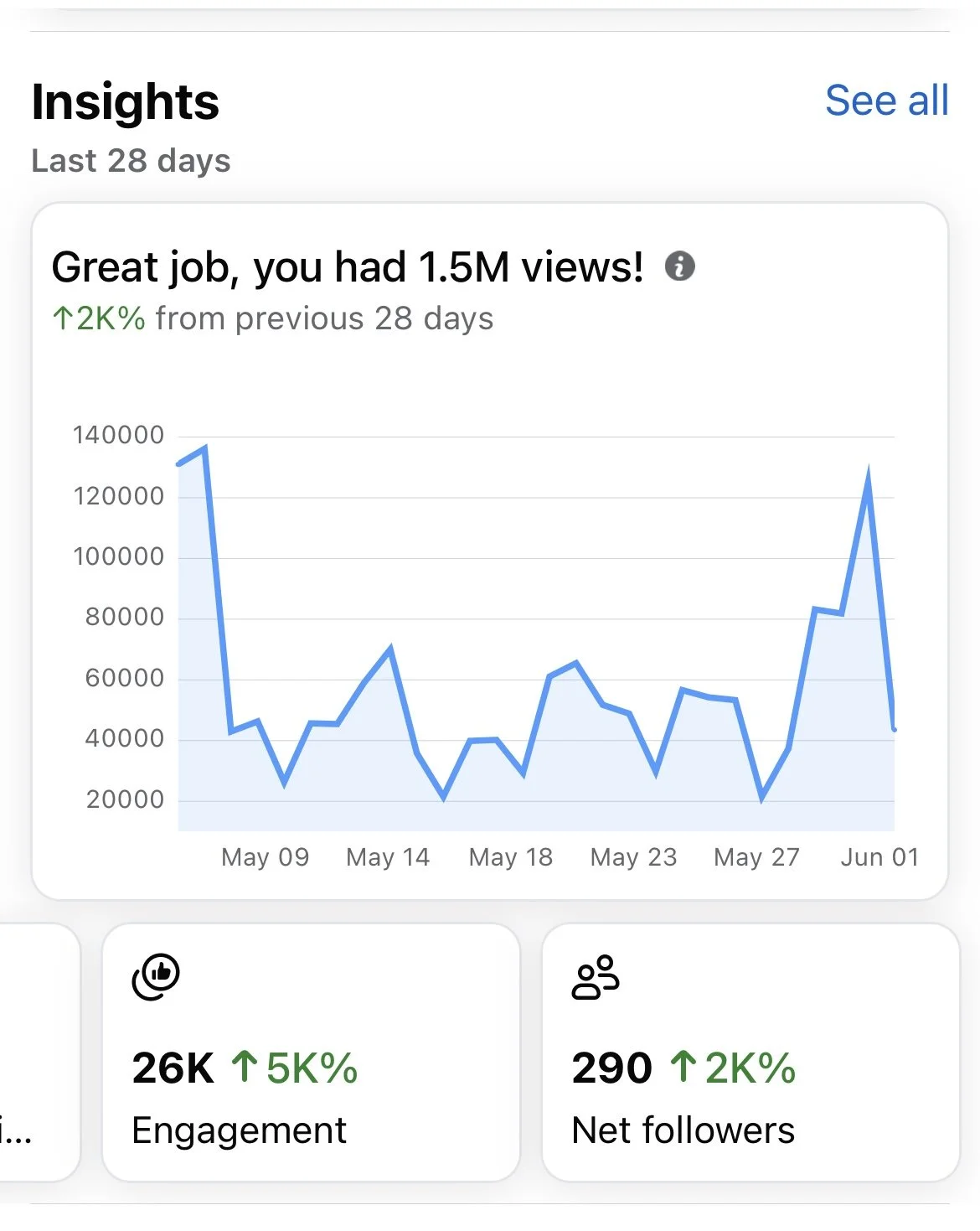
An example of platform results from the original workflow. Click to enlarge.
The biggest benefit of planning and batching isn't just the time you save.
It's the mental space you get back.
You stop waking up wondering what to post. You stop interrupting your work to write another caption. And you stop treating social media like something that requires your attention every hour of the day.
My own workflow has saved me roughly ten hours a week compared with managing everything reactively. Your results will depend on how much time you're spending now and how much content you're producing.
But even saving three or four hours every week is meaningful.